
Custom Acne Patch Artwork: Outline, Sheet Layout and Approval
Prepare custom acne patch artwork with separate outlines, sheet layouts and packaging versions. Use an illustrated pack-count example and approval checklist.
Prepare separate artwork layers for the patch outline, sheet layout and printed packaging. Give each file a version, state dimensions in a named unit, and reconcile the drawing with a physical sample before approval. A decorative preview alone does not define a manufacturable patch or a complete retail pack.
A custom star, heart or cartoon patch may look clear on a screen while leaving important production questions unanswered. Which line is the cutting outline? How many of each shape belong on a sheet? Is the logo intended for the patch or only the packaging? This guide turns that visual idea into a reviewable artwork handoff for a private label acne patch project.
1. Separate the outline, layout and packaging
The patch drawing defines the requested shape and dimensions. The sheet layout identifies how many patches of each shape or size belong on a sheet. Packaging artwork describes the wrapper, pouch or retail box, including its printed information. Keep these records connected, but do not treat them as the same file.
First choose the material discussion for your project. MZBIO lists custom-shape hydrocolloid references and custom-shape hydrocolloid references separately. A shared outline does not establish that the materials, backing or finished pack are interchangeable. Use the Private Label Hydrocolloid Acne Patch Specification Checklist for the broader product brief.
| Record | Show or state | Confirm before approval |
|---|---|---|
| Patch outline | Drawing ID, units, overall dimensions and separate cutting line | Feasible outline, agreed tolerances and any tooling discussion |
| Sheet layout | Each shape, size, quantity and layout version | Patch count, liner arrangement and the physical sample |
| Packaging artwork | Pack format, approved dieline, print surfaces and artwork ID | Fit, text, pack count, barcode location and printed sample |
2. Send a drawing that can be reviewed
Place the desired appearance beside a dimensioned drawing rather than relying only on a lifestyle photograph. Label the measurement unit. For an irregular shape, identify overall width and height and any feature whose position or size matters to the design. Keep decorative graphics and the proposed cut path distinguishable.
If different shapes share a sheet, list each one and its quantity. Name the material reference separately from the artwork. Mark any spacing, printable area or liner detail that still needs the manufacturer's proposal as “to confirm.” Do not copy a cutting gap or tooling allowance from another product and present it as an approved requirement.
Ask which editable file format the supplier accepts before preparing final files. Where vector artwork is requested, confirm how fonts, linked images, layers and color references should be delivered. There is no universal file-format requirement or print tolerance established by this article. Keep a PDF or image proof for review, but identify the editable production file separately.
For packaging, request the relevant dieline before locking the layout. A useful review identifies trim, fold, print and non-print areas where applicable. The supplier should confirm which template belongs to your chosen pack. Record who will verify the barcode and label text rather than treating a visual proof as evidence that every code or claim is correct.
3. Reconcile the drawing with the pack count
The illustration below is a counting example, not a product offer, an MOQ or a confirmed production layout. It shows why a patch count must travel with the artwork version.
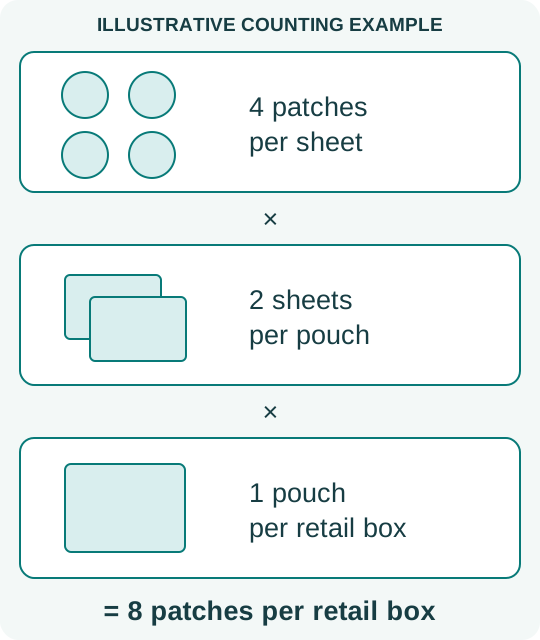
If the artwork changes from four patches on each sheet to six, keeping the same number of sheets changes the finished patch count. If the patch count printed on the box stays unchanged, the artwork and physical contents no longer describe the same pack. Update both records and request confirmation before treating the revision as approved.
For a sheet with mixed shapes, write the count explicitly: for example, “two stars and two hearts” rather than “four assorted patches.” The shape mix in this example is illustrative. Ask the manufacturer to confirm the feasible layout and evaluate the actual sample rather than assuming that the illustration can be produced unchanged.
4. Approve the file version and the physical sample together
A digital proof can document the intended outline and artwork placement. The physical sample is the reference for the agreed finished appearance, sheet mix, liner arrangement and packaging fit. Record the drawing ID, artwork ID and sample ID together so an approval cannot accidentally refer to an older attachment.
Use separate decisions for outline, sheet mix, printing and packaging: approved, revise or open. Add the requested correction and the file version that supersedes the previous one. If the material or layout changes, ask which approvals and evaluations need to be repeated and how the revision affects sample costs or the quotation.
Keep marketing claims outside the artwork team's assumptions. Ask for documentation applicable to the selected product and destination market before printing performance or certification claims. This artwork checklist does not establish efficacy, safety testing, certification or label compliance.
Before an order, reconcile the final sample, drawing, sheet count, finished-pack count and quantity per design with the OEM Patch Sample Approval Checklist and written quotation. Confirm any tooling, artwork, sampling and packaging charges rather than assuming that they are included in a unit price.
Buyer questions
Can I start with a logo and a reference photograph?
Yes, they can communicate the starting idea. Mark them as references and ask what dimensioned drawing, sheet layout and packaging template are needed before final artwork approval.
Does the same star shape guarantee an identical patch specification?
Do not assume that it does. Identify the selected material and reference, then have the outline and layout reviewed for that construction. Keep the two sample briefs separate until the supplier confirms the chosen specification.
Should packaging artwork be approved before the patch sample?
Drafts can progress together, but final approval should reconcile the actual sheet format and pack contents with the packaging version. Leave unresolved fit or count questions open instead of declaring the entire pack approved.
Use a blank buyer record
Download the blank acne patch artwork approval record (TXT, English). Leave unresolved fields open. This template does not record a test result or approve a product.
Discuss your product reference
Send the reference, drawing or artwork version, quantity per design, pack contents and destination country. MOQ depends on product characteristics. A sample fee is required upfront and refunded after an order is placed; confirm the amount and how the refund is applied in the quotation.
Before finalizing artwork, use the Hydrocolloid Acne Patch Materials and Packaging Guide to distinguish the chosen construction and ingredient questions from the decorative design.
Scope: a buyer workflow prepared from the MZBIO catalog and purchasing guides. Examples are illustrative. Product feasibility, evaluations and commercial terms require confirmation for the selected specification.